Accidental deletion
Recover files, folders, or earlier versions without rebuilding days of work.
Backup & Disaster Recovery
GingaTech protects laptops, desktops, workstations, servers, NAS, and cloud data with monitored backups, verified recovery points, and a practical plan for getting back to work.
Monitored, verified, and tested—not simply scheduled
Latest verification
SuccessfulEveryday resilience
A deleted folder, failed drive, stolen laptop, ransomware incident, bad update, or building outage can interrupt an otherwise healthy business. Independent, tested backups turn those moments into a recovery process instead of a crisis.
Recover files, folders, or earlier versions without rebuilding days of work.
Keep protected recovery points beyond the reach of a compromised device or account.
Restore a failed workstation or server to replacement hardware or a temporary virtual system.
Maintain an offsite copy when the original device—and even the office—is unavailable.
Roll back to a known-good point when an application, database, or operating system fails.
Protect business data independently; synchronization and recycle bins are not a complete backup strategy.
Complete coverage
We match protection, retention, and recovery options to the value of each workload—not a one-size-fits-all checkbox.
Image-based and file-level protection for office, remote, and executive computers.
Reliable protection for specialized applications, large project files, and hard-to-rebuild configurations.
System, application, and data recovery for the servers your operations depend on.
Protection for VMware and Hyper-V workloads, with recovery options designed around downtime targets.
Managed local storage, shares, snapshots, replication, and independent offsite backup.
Independent protection for supported mail, files, collaboration data, cloud workloads, and business applications.
Managed protection
A backup job can finish successfully and still fail when you need it. We combine secure recovery technology with active monitoring, verification, documentation, and human follow-through.
Policy-based recovery points capture the complete system so files—or an entire machine—can be restored.
Data is protected in transit and at rest, with retention aligned to operational and regulatory needs.
Protected copies help resist ransomware, malicious deletion, and compromised administrator credentials.
Recoverability checks and evidence help identify bad backups before an emergency exposes them.
Restore a file, folder, volume, complete device, virtual disk, or temporary virtual system as the situation demands.
Centralized alerts, reports, ticketing, and technician review turn failures into actions—not surprises.
Managed network storage
A well-designed NAS can centralize files, accelerate local recovery, support high-speed production workflows, and provide resilient storage for growing teams. We design the capacity, network, access, and protection around the way your business works.
Controlled team shares, archives, and department data.
A nearby recovery tier for priority systems when minutes matter.
High-throughput storage for studios, engineering, design, and large datasets.
Right-sized retention and organized long-term storage where appropriate.
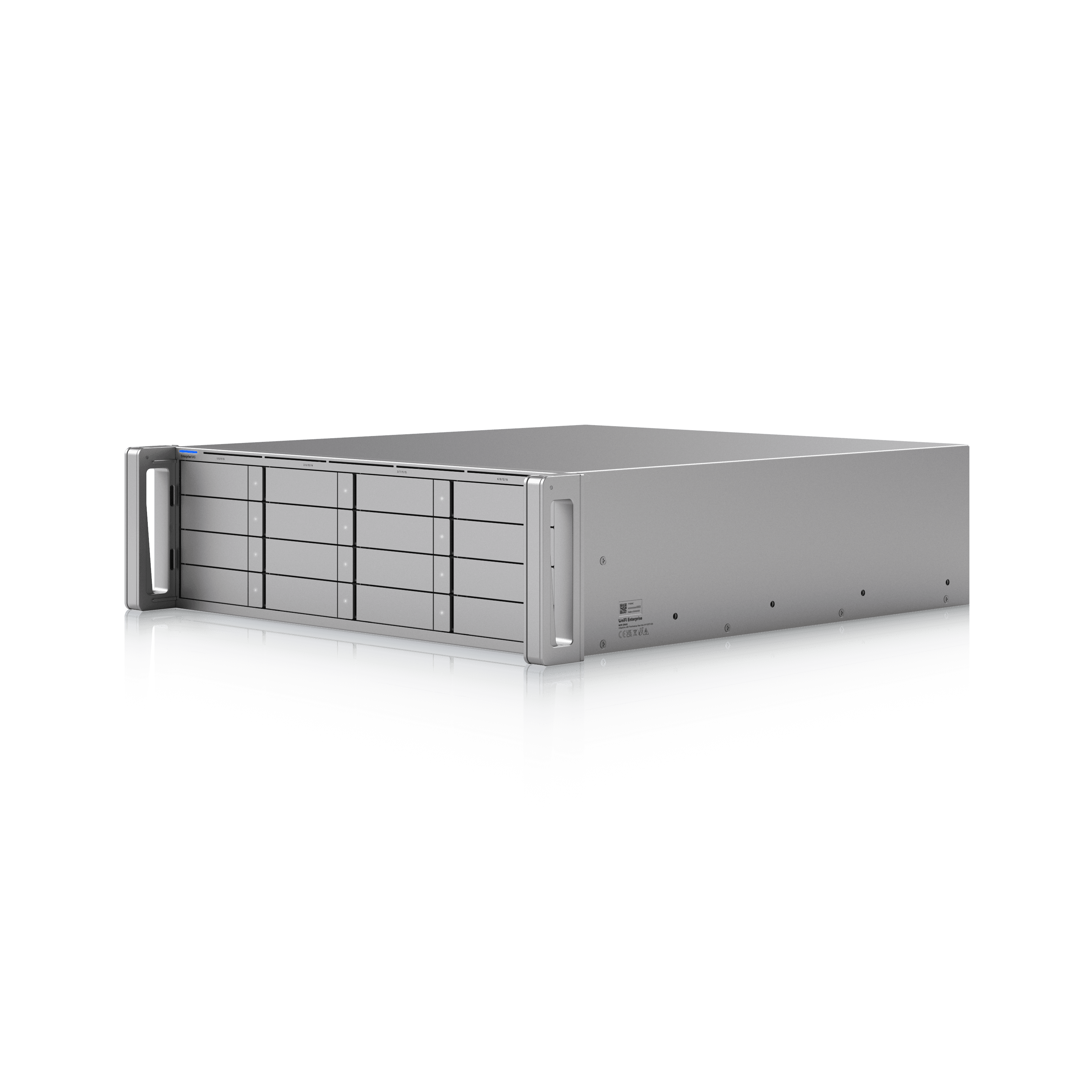
Featured product: UniFi Enterprise NAS. Current hardware includes 16 SATA bays, M.2 NVMe support, dual 25G SFP28, 10GbE RJ45, expansion connectivity, and redundant hot-swappable power. Final configuration depends on availability and the storage design.
!RAID is not backup. A NAS still needs independent, preferably offsite and immutable, recovery copies.
Business continuity
Disaster recovery is the people, priorities, dependencies, communications, and tested steps that turn protected data into restored operations.
Identify critical systems, business owners, dependencies, and acceptable downtime.
Define how much data can be lost (RPO) and how quickly each service should return (RTO).
Create contacts, escalation paths, recovery order, access requirements, vendors, and clear runbooks.
Run tabletop exercises and technical restores, record the evidence, and correct what does not work.
Update the plan after system, staffing, site, or supplier changes—and rehearse it again.
Recovery can include a single-file restore, bare-metal rebuild, replacement-device recovery, local or cloud virtualization, alternate work locations, and controlled failback to normal operations.
Data loss prevention
Backups protect availability; data loss prevention protects sensitive information from accidental or inappropriate sharing. We can assess, implement, tune, and manage DLP capabilities across Microsoft 365, endpoints, and supported data locations.
Find sensitive information and apply consistent classifications or sensitivity labels.
Use identity, permissions, encryption, and sharing controls appropriate to the data.
Identify sensitive content moving through email, chat, cloud storage, browsers, USB, print, and endpoints where supported.
Audit activity, warn users, require justification, or block high-risk actions according to policy.
Review incidents, tune false positives, document exceptions, and train employees with real workflows.
Align policies with business needs, privacy obligations, retention, and available Microsoft licensing.
A stronger backup standard
We use the 3-2-1 principle as a practical foundation: keep three copies of important data, on two types of media, with one copy offsite. Modern plans also isolate at least one recovery copy from everyday accounts and systems.
The GingaTech approach
Map systems, data, risks, current backups, recovery needs, and insurance or compliance questions.
Set coverage, retention, recovery targets, security controls, storage tiers, and the disaster-recovery runbook.
Protect endpoints, servers, NAS, cloud data, accounts, and the network path that recovery depends on.
Verify backups, perform restores, rehearse the plan, document results, and close gaps.
Monitor every day, respond to failures, review reports, and keep the plan aligned as the business changes.
GingaTech
Let us review what is protected, what is missing, and how long a real recovery would take—before an incident answers those questions for you.